the last post was about reading pi sessions from disk. natural follow-up: instead of reading the data after the fact, hook into the agent live. pi extensions are the surface for that. this post walks through writing a minimal one end-to-end, ending with an event pipeline into axiom.
a pi extension is typescript code dropped into ~/.pi/agent/extensions/* (global) or .pi/extensions/* (project-local) that gets auto-discovered when pi starts. the entry point exports a default function that receives the pi instance, which exposes event hooks (pi.on(...)) and registration helpers (pi.registerTool, pi.registerCommand).
What I want to learn
- the dev flow for running an extension in dev mode
- what a pi extension is for, and what it is not for
- what api shape the extension has to work with
Approach
- read the docs on pi extensions. answer:
- how does pi recognize an extension exists?
- what indication do we have that the extension is loaded?
- when does pi interact with the extension?
- quickstart a pi extension locally. answer:
- what does the extension repo shape look like?
- what does a local install require?
What I found
From the docs
auto-discovery happens in two places: ~/.pi/agent/extensions/* for global installs and .pi/extensions/* inside a project for local ones. there's also a pi e - <path> command for quick tests, which looks like a dynamic include. useful for trying an extension without committing to the dir layout.
session persistence shows up in the key capabilities:
pi.appendEntry(); // store state that survives restarts
looks like the way to interact with the SessionManager is that you're given the pi instance directly.
the example extension is easy to grok:
// ~/.pi/agent/extensions/my-extension.ts

import type { ExtensionAPI } from '@earendil-works/pi-coding-agent';

export default function (pi: ExtensionAPI) {
  // react to events
  pi.on('session_start', async (_event, ctx) => {
    //
  });

  pi.on('tool_call', async (event, ctx) => {
    //
  });

  // register a custom tool
  pi.registerTool({
    //
  });

  // register a command
  pi.registerCommand('hello', {
    //
  });
}
export default function, get back pi, hang event handlers off pi.on, register tools and commands via pi.register*. besides being auto-discovered, you can also configure extra extension paths in settings.json.
extension shape from the docs:
~/.pi/agent/extensions/
└── my-extension/
    ├── package.json    # declares dependencies and entry points
    ├── package-lock.json
    ├── node_modules/   # after npm install
    └── src/
        └── index.ts
Bootstrap a project
create the shape:
cd ~/source
mkdir my-pi-ext && cd my-pi-ext
mkdir -p .pi/extensions/hello-pi
touch .pi/extensions/hello-pi/index.ts
tree -a .
.
└── .pi
    └── extensions
        └── hello-pi
            └── index.ts
install deps and paste the example into hello-pi/index.ts:
pnpm add -d typescript@5.9.3 @earendil-works/pi-coding-agent
open it in nvim. no squiggles. CONFIRMED.
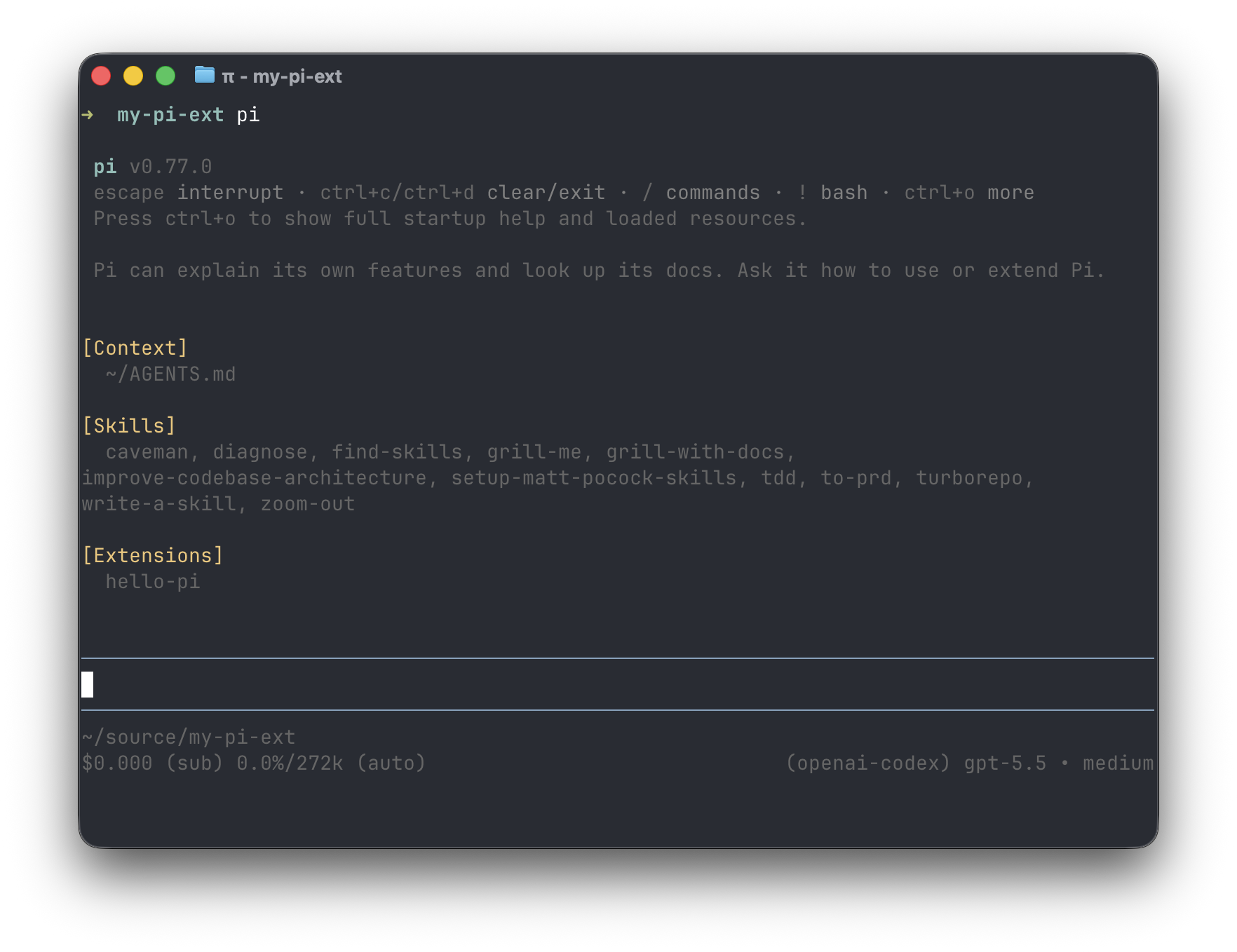
check whether the extension actually loads:
Append a custom entry
now try appending something to the session:
type HelloPiMsg = {
  msg: string;
};

pi.on('session_start', async (_event, ctx) => {
  pi.appendEntry('hello_pi_msg', { msg: 'hello, pi!' } satisfies HelloPiMsg);
});
started pi and took no further action. ls on the homedir .pi sessions dir came back empty. sent a message, and the session log appeared with the custom entry. so sessions and extensions are both lazy.
{"type":"session","version":3,"id":"019e725d-d09b-7ff6-9299-5c7014508930","timestamp":"2026-05-29T06:13:31.419Z","cwd":"/Users/khosford/source/my-pi-ext"}
{"type":"model_change","id":"fb384e44","parentId":null,"timestamp":"2026-05-29T06:13:31.438Z","provider":"openai-codex","modelId":"gpt-5.5"}
{"type":"thinking_level_change","id":"62d7bdb1","parentId":"fb384e44","timestamp":"2026-05-29T06:13:31.438Z","thinkingLevel":"medium"}

// session started and logged
{"type":"custom","customType":"hello_pi_msg","data":{"msg":"hello, pi!"},"id":"c982bea3","parentId":"62d7bdb1","timestamp":"2026-05-29T06:13:31.459Z"}
{"type":"message","id":"c887994d","parentId":"c982bea3","timestamp":"2026-05-29T06:13:47.371Z","message":{"role":"user","content":[{"type":"text","text":"boop. say okay."}],"timestamp":1780035227370}}

// ...
custom entries land as type: "custom" with a customType discriminator i pick.
Access session context
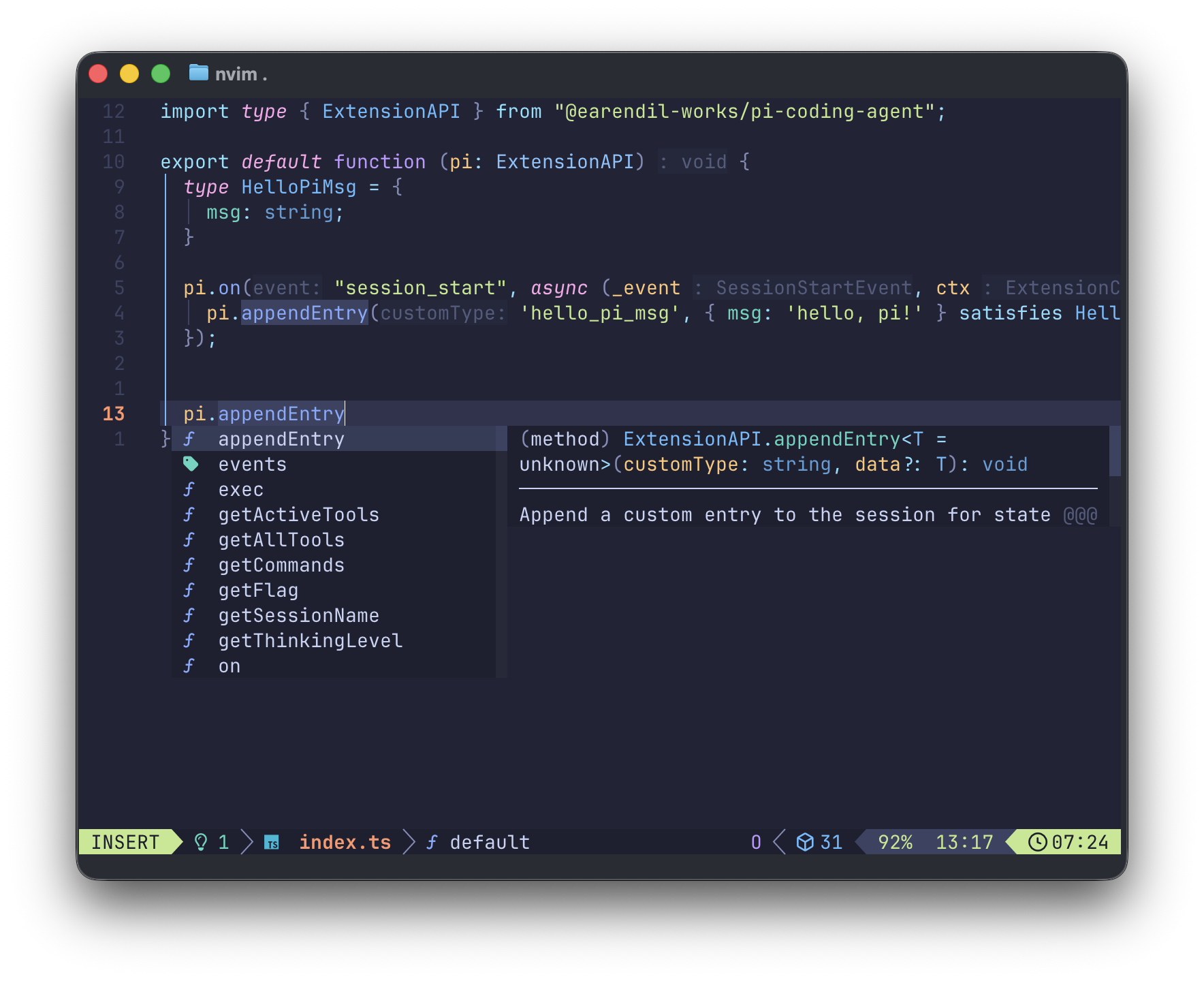
can the callback access session context directly? checked the editor completions:
confirmed with someone smarter:
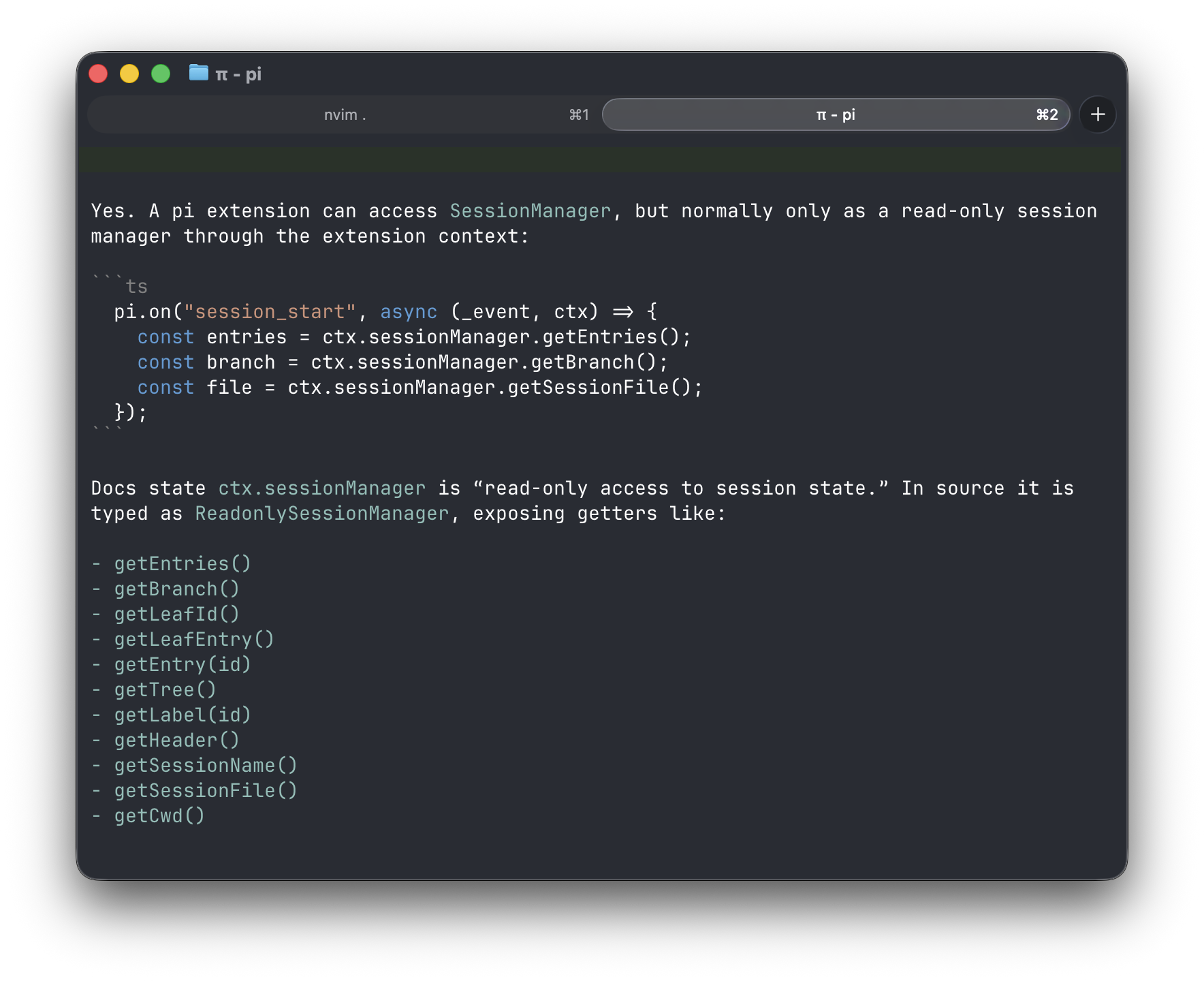
human is dumb. literally just intuited that sessions are lazy in some sense, so of course access would be provided in the callback. plus the method signature is right there.
Ship events to Axiom
now make it do something useful. send token usage and cost off-machine. axiom is convenient. wire message_end into a dataset, and flush on agent_end so nothing gets dropped at session close:
pi.on('message_end', async (event, ctx) => {
  if (!axiom || !dataset || event.message.role !== 'assistant') return;

  const { usage } = event.message;
  axiom.ingest(dataset, {
    sessionId: ctx.sessionManager.getSessionId(),
    provider: event.message.provider,
    model: event.message.model,
    api: event.message.api,
    input: usage.input,
    output: usage.output,
    cacheRead: usage.cacheRead,
    cacheWrite: usage.cacheWrite,
    totalTokens: usage.totalTokens,
    costTotal: usage.cost.total,
  });
});

pi.on('agent_end', async () => {
  if (!axiom) {
    pi.appendEntry('hello_pi_axiom_flush_missed', { reason: 'axiom undefined' });
    return;
  }

  await axiom.flush();
});
the missed-flush case writes its own custom entry to the session log, so misconfigurations show up in the same place i'd be looking for everything else. then it's a matter of getting env vars loaded so pi run from anywhere sees them.
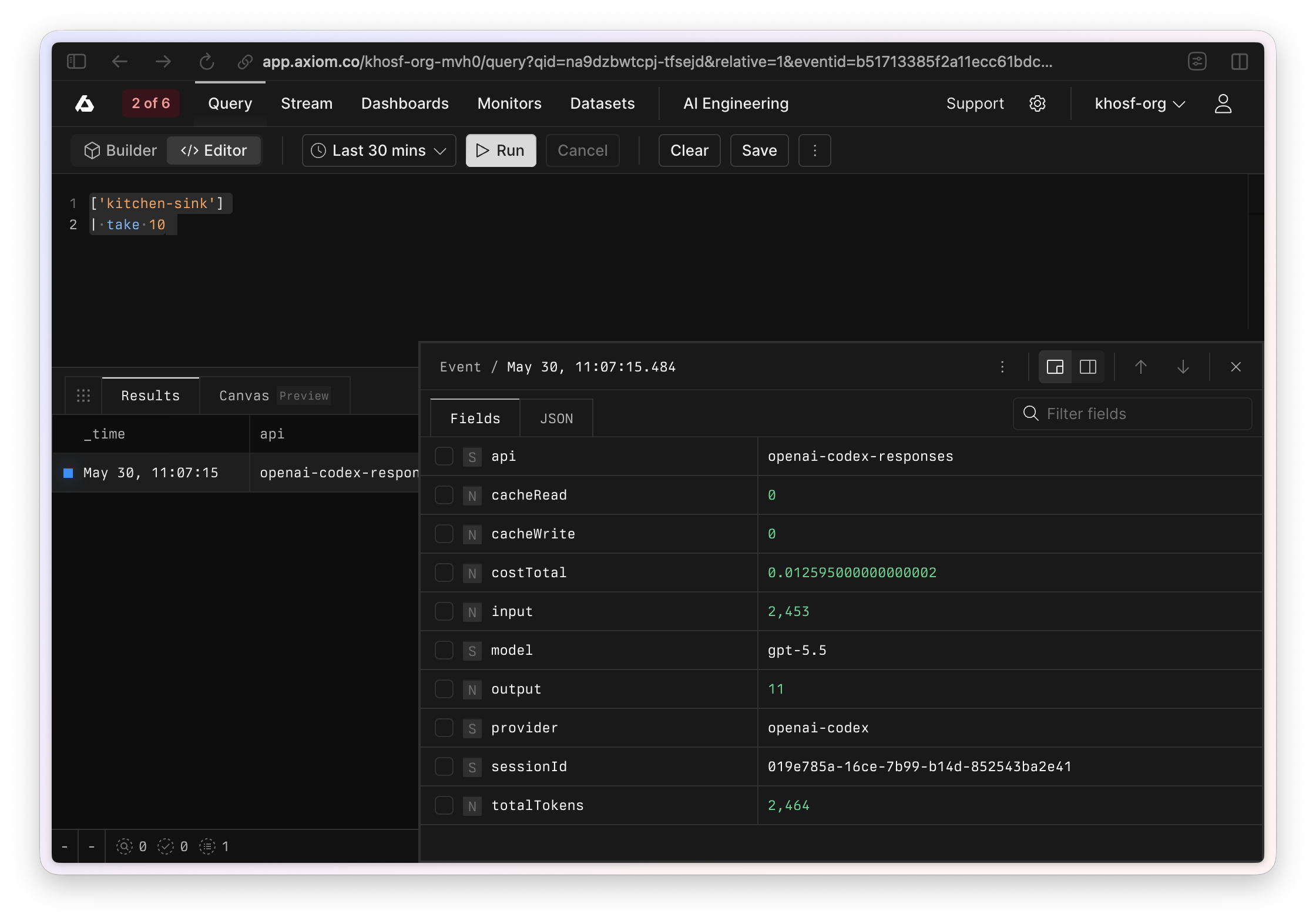
hey, it worked.
What's next
observing pi feels doable now. next moves probably live on the other side of the api: modifying the experience or the agent itself. tui customization, agent customization, something else. need to sit with it before picking.